Server integration
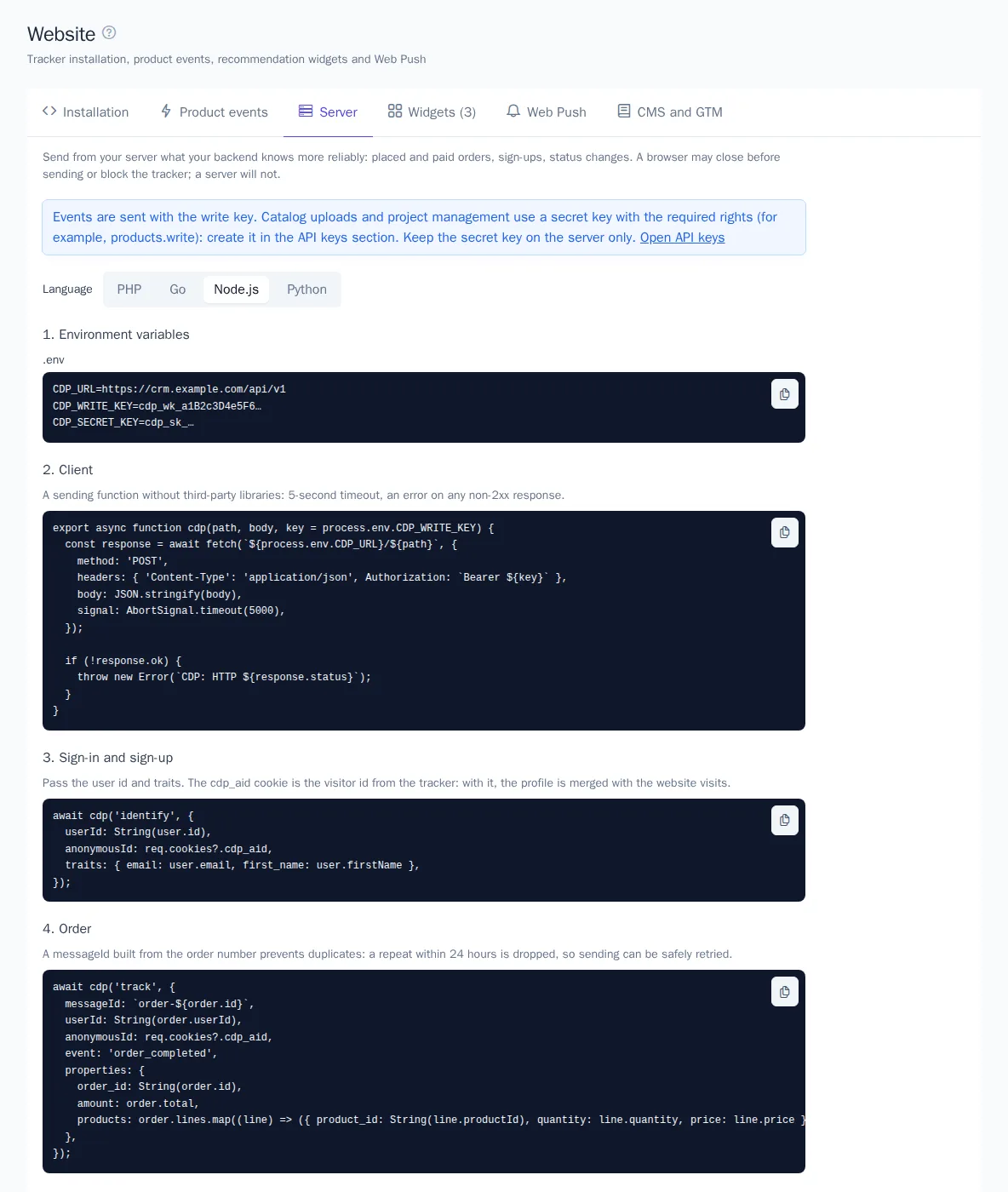
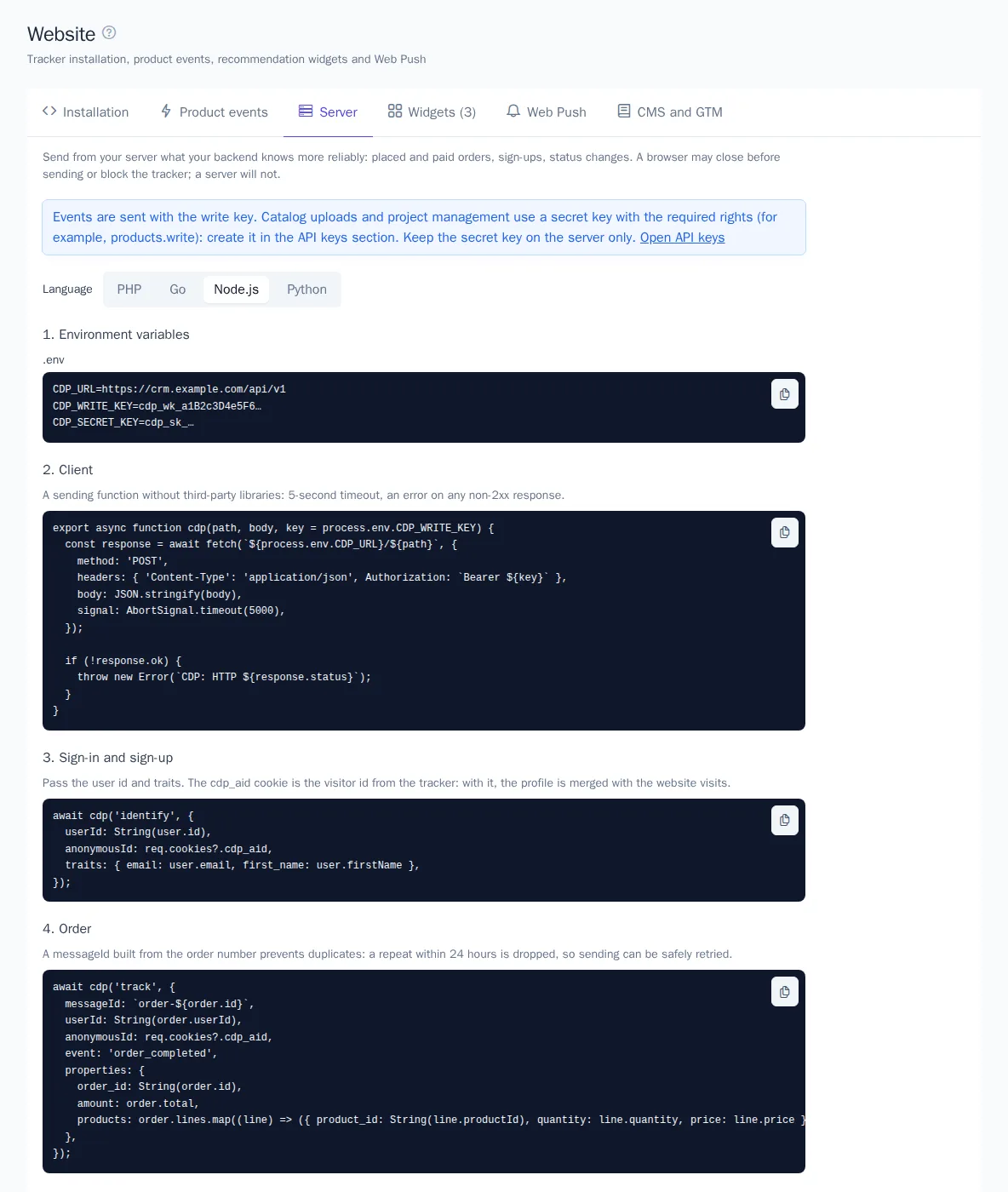
Some data is more reliable to send from your website's server than from the browser: placed and paid orders, sign-ups, status changes, and the product catalog. A browser can close before sending or block the tracker; a server can't. Ready-made examples are in Engagement → Website on the Server tab.
This article is for developers. The website tracker stays in place: it counts views and shows widgets, and the server adds important events on top of it.
Server tab
The tab has a Language switch: PHP, Go, Node.js, and Python. The examples use no third-party libraries and already include the OneTrace.pro address, event names, and the product ID property from your project settings. Your browser remembers the selected language.
For PHP the tab may also offer a ready-made library — a Composer package with the whole API, retries on failures without duplicates and an event buffer. If the tab shows the Ready-made PHP library block, install the package with the command from the example; the other examples show the same calls as plain HTTP requests. The same block has a Laravel package: events are sent after the response or through the queue, a directive adds the tracker to templates, products are synced from models.
Keys
- Write key (
cdp_wk_…, Write type): for sending events. The same key as in the tracker code. - Secret key (
cdp_sk_…, Secret type): for uploading the catalog and managing the project. For the catalog, it needs the Upload and delete products permission (products.write).
Keys are created in the API keys section by Owner and Administrator. Keep the secret key on the server only and never put it in page code.
Steps
1. Environment variables
Put the address and keys in your server's environment variables, not in the code. You can choose your own variable names:
CDP_URL=https://cdp.onetrace.pro/api/v1
CDP_WRITE_KEY=cdp_wk_…
CDP_SECRET_KEY=cdp_sk_…
2. Client
The send function: a POST with JSON, the key in the Authorization: Bearer header, a 5-second timeout, and an error on any non-2xx response.
PHP:
function cdp_send(string $path, array $body, string $keyEnv = 'CDP_WRITE_KEY'): void
{
    $ch = curl_init(getenv('CDP_URL') . '/' . $path);
    curl_setopt_array($ch, [
        CURLOPT_POST => true,
        CURLOPT_HTTPHEADER => ['Content-Type: application/json', 'Authorization: Bearer ' . getenv($keyEnv)],
        CURLOPT_POSTFIELDS => json_encode(array_filter($body, fn ($v) => $v !== null), JSON_UNESCAPED_UNICODE),
        CURLOPT_RETURNTRANSFER => true,
        CURLOPT_TIMEOUT => 5,
    ]);
    curl_exec($ch);
    $status = curl_getinfo($ch, CURLINFO_RESPONSE_CODE);
    curl_close($ch);

    if ($status >= 300) {
        throw new RuntimeException("CDP: HTTP {$status}");
    }
}
Node.js:
export async function cdpSend(path, body, key = process.env.CDP_WRITE_KEY) {
  const response = await fetch(`${process.env.CDP_URL}/${path}`, {
    method: 'POST',
    headers: { 'Content-Type': 'application/json', Authorization: `Bearer ${key}` },
    body: JSON.stringify(body),
    signal: AbortSignal.timeout(5000),
  });
  if (!response.ok) throw new Error(`CDP: HTTP ${response.status}`);
}
3. Sign-in and sign-up
Send the user ID and traits. The cdp_aid cookie is the visitor ID issued by the tracker. Pass it as anonymousId, and the customer's profile will be merged with their website visits.
cdp_send('identify', [
    'userId' => (string) $user->id,
    'anonymousId' => $_COOKIE['cdp_aid'] ?? null,
    'traits' => ['email' => $user->email, 'first_name' => $user->first_name],
]);
await cdpSend('identify', {
  userId: String(user.id),
  anonymousId: req.cookies?.cdp_aid,
  traits: { email: user.email, first_name: user.firstName },
});
Don't send empty traits: a null value removes the trait from the profile.
4. Order
A purchase event with the order's products. A messageId based on the order number protects against duplicates: a repeat with the same messageId within 24 hours is discarded, so you can safely retry sending.
await cdpSend('track', {
  messageId: `order-${order.id}`,
  userId: String(order.userId),
  anonymousId: req.cookies?.cdp_aid,
  event: 'order_completed',
  properties: {
    order_id: String(order.id),
    amount: order.total,
    products: order.lines.map((line) => ({ product_id: String(line.productId), quantity: line.quantity, price: line.price })),
  },
});
In PHP, it's the same cdp_send('track', [...]) call with the same fields. The event name and the product ID property must match the settings in the Recommendations section, or purchases won't reach the models.
5. Product catalog
Products and categories are uploaded with a secret key, up to 1,000 per request. Uploading the same id again updates the product.
cdp_send('products', [
    'items' => [[
        'id' => 'SKU-1', 'name' => 'Sneakers', 'url' => 'https://shop.example.com/p/sku-1',
        'image' => 'https://shop.example.com/i/sku-1.jpg', 'price' => 4990, 'currency' => 'RUB',
        'available' => true, 'category_ids' => ['shoes'], 'brand' => 'Brand',
    ]],
    'categories' => [['id' => 'shoes', 'name' => 'Shoes']],
], 'CDP_SECRET_KEY');
If your catalog already exists as a feed (YML, Google Merchant, CSV), it's easier to connect the feed in the Recommendations section.
Tips
- Send from a background queue, not in the handler of the customer's request: this way your website's response doesn't depend on the network.
- Retry on errors. A
202response means the event was accepted and will be processed within seconds. On429(rate limit or monthly event quota exceeded) and5xx, retry later with the samemessageId. - Limits: a message up to 32 KB, up to 500 messages per
/batch, and a request body up to 1 MB. A write key accepts up to 6,000 requests per minute. - The website domain restriction doesn't apply to server requests.
The full list of methods is in the API reference: https://cdp.onetrace.pro/api/v1/openapi.json.