Plan and billing
The Plan and billing page shows which plan the project is on, how much of the included volume has been used, and which invoices have been issued and paid. This is also where you choose a plan and enter billing details. Members with the plan and billing permission can see the page — by default, the Owner.
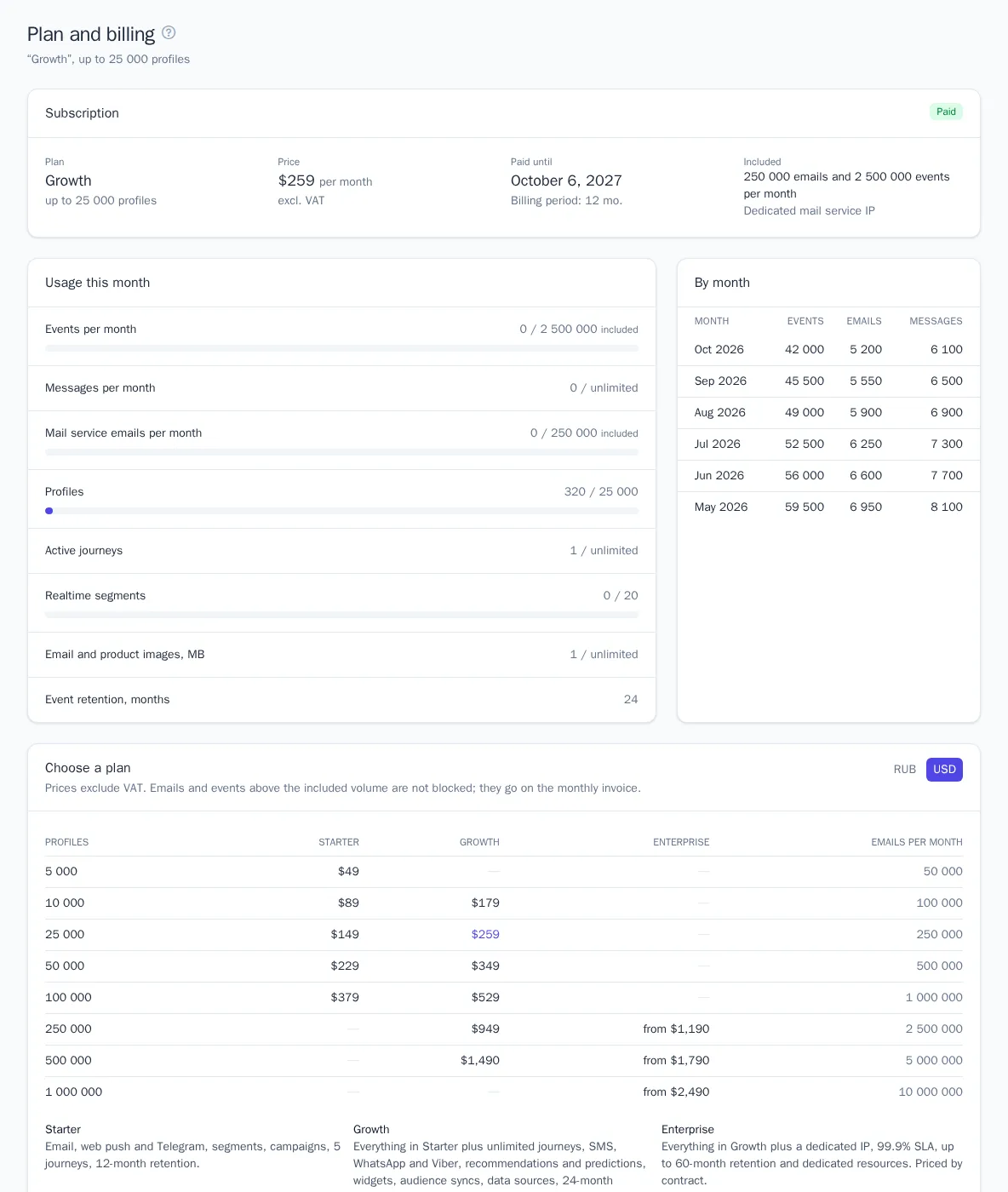
Plans
The plan price depends on the band — the largest number of profiles in the project (deleted and merged profiles don't count). All prices exclude VAT and are in rubles or US dollars; you choose the currency before paying.
| Plan | What's included |
|---|---|
| Starter | email, web push, and Telegram, segments, campaigns, up to 5 active journeys, 3 realtime segments, 12-month event retention |
| Growth | everything in Starter plus unlimited journeys, SMS, WhatsApp, and Viber, product recommendations, predictions, website widgets, audience syncs, data sources, migration from other platforms, 20 realtime segments, 24-month retention |
| Enterprise | everything in Growth plus a dedicated mail service IP, up to 60-month retention, and dedicated resources; price and limits by contract |
Every plan includes 10 mail service emails and 100 events per month for each profile in the band: a band of up to 25,000 profiles includes 250,000 emails and 2.5 million events. The project can have any number of users.
If a feature isn't in your plan, the section opens a page explaining which plan includes it. On Starter, you can't create an SMS, WhatsApp, or Viber integration.
Free trial
A new project runs on the Growth plan free of charge for 14 days: all its features are available for up to 1,000 profiles. Emails through the mail service go only from a verified domain, up to 500 per day — the rest wait for the next day and go out automatically.
Three days and one day before the trial ends, the owner gets an email, and a reminder appears at the top of the project pages. To keep working, choose a plan and pay the invoice before the trial ends.
How to choose a plan and pay
- Open Plan and billing and switch the currency in the Choose a plan block: RUB or USD.
- Choose the plan and number of profiles, the billing period, and any add-ons:
- Billing period — one month, six months (10% off), or a year (20% off);
- Extra event retention — +12, +24, or +36 months, 15% of the plan price for every 12 months;
- Dedicated mail service IP — the project's emails go from their own address, so your reputation doesn't depend on other senders.
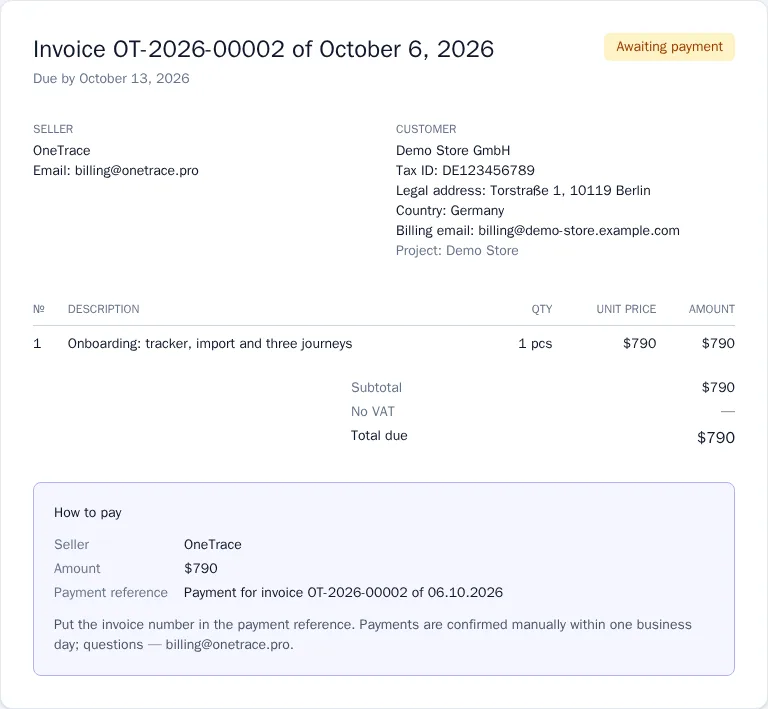
- Click Issue invoice. The invoice opens with payment instructions.
- Pay the invoice by bank transfer and put the invoice number in the payment reference. Payments are confirmed within one business day; after that the plan is activated and the invoice is marked Paid.
The Enterprise plan can't be selected on the page: write to us — the address is next to the button — and the plan will be set up under a contract.
Changing the plan
- An upgrade — a more expensive plan or more profiles — takes effect as soon as the new invoice is paid. Unused days of the paid period are credited to the invoice.
- A downgrade and a currency change take effect from the next period: until then the project stays on the current plan, and the renewal invoice is issued for the new one.
Renewal and paying on time
A week before the paid period ends, an invoice for the next period is issued — it arrives by email and appears in the Invoices list.
If the period ends and the invoice isn't paid, the project keeps working as usual for another 7 days, with a reminder and a date at the top of the pages. After that, the project switches to read-only mode:
- all data is kept, and you can view sections and reports;
- changes, sending, and event collection stop, and the API responds with code 402;
- the Plan and billing page keeps working — once you pay, the project resumes immediately.
The project also switches to read-only mode if the trial ends without payment.
Above the included volume
Emails and events above the volume included in the plan are not stopped: the overage goes on a separate invoice at the start of the next month.
| Item | Starter | Growth | Enterprise |
|---|---|---|---|
| 1,000 emails | ₽30 / $0.40 | ₽25 / $0.30 | ₽20 / $0.25 |
| 1 million events | ₽400 / $5 | ₽400 / $5 | ₽400 / $5 |
The Usage this month block shows usage as bars: yellow means 90% or more is used, red means the included volume is used up. Below it you see how much has accumulated above the plan and what it will cost. At 90% and 100% of the included volume, the owner gets an email. If you go over regularly, a larger band is cheaper.
Sending does stop if usage exceeds three times the included volume: this protects you from an integration bug and an unexpected invoice. During the trial, the limit is the included volume itself.
Invoices and acts
The Invoices block lists all project invoices: for the plan, for overage, and for one-off services. The status shows whether an invoice is awaiting payment, paid, overdue, or void.
- Click an invoice number to open the document. The Download PDF button saves the invoice or act as a PDF file, and Print or save as PDF prints the page. PDFs of ruble invoices are in Russian, and those of dollar invoices are in English.
- If your contract requires an act (a certificate of services rendered), it is available for a paid invoice.
- If you choose a different plan, the unpaid plan invoice is voided and a new one is issued.
Billing details
In the Billing details block, enter the company, tax ID, address, country, and billing email. The details are used on new invoices and acts — documents already issued don't change. New invoices are emailed with the PDF attached to the owner and to the billing email. Prices exclude VAT: buyers in Cyprus are charged 19% VAT, companies from other EU countries with a VAT ID are invoiced under the reverse charge, and customers outside the EU are not charged VAT.
Good to know
- All plan changes and issued and paid invoices are recorded in the project audit log.
- Projects set up through a partner are on the partner's plan: the page shows usage, and you discuss the plan and payment with the partner.
- The platform administrator can switch a project to No plan, where the brand plan limits apply, or to Unlimited. In both modes there's no subscription and no plan invoices.