AI in chat
AI in live chat helps you answer customers. It writes reply drafts for operators, while the bot answers customers on its own, on the website and in messengers, and hands the conversation to people when it can't help. The AI answers only from the store's knowledge base and the customer's own data: orders, rewards, promo codes, and catalog products. It doesn't make anything up: if there's no answer, it says so or passes the question to an operator. A fast rating model also checks every customer message and every bot reply, and analyzes closed conversations by topic and outcome. See Checks.
Connect your store to the bot, and it will answer with live data on orders, tracking, and stock and, with your permission, cancel orders and pass requests to the store. See Store data for the bot.
AI in chat works on any paid plan and is charged by usage from the project balance. See Billing.
Reply draft
In the conversation window, next to the send button, there's a button with sparkles: Draft reply. The AI reads the conversation, checks the knowledge base and the customer's orders if needed, and writes a reply in the input box. If you've already started typing, the draft is added after your text. The sources of the reply are shown below the box: articles, website pages, an order with a tracking link, and products.
A draft doesn't send anything: review and edit the text, then send it as usual. Replies sent from a draft are counted in the report.
If the button is inactive, its tooltip explains why: the plan doesn't include paid AI, the balance is empty, or the spending limit is reached.
Bot
The bot is set up in Chats → Chat settings → Bot (Manager and above). It's off by default.
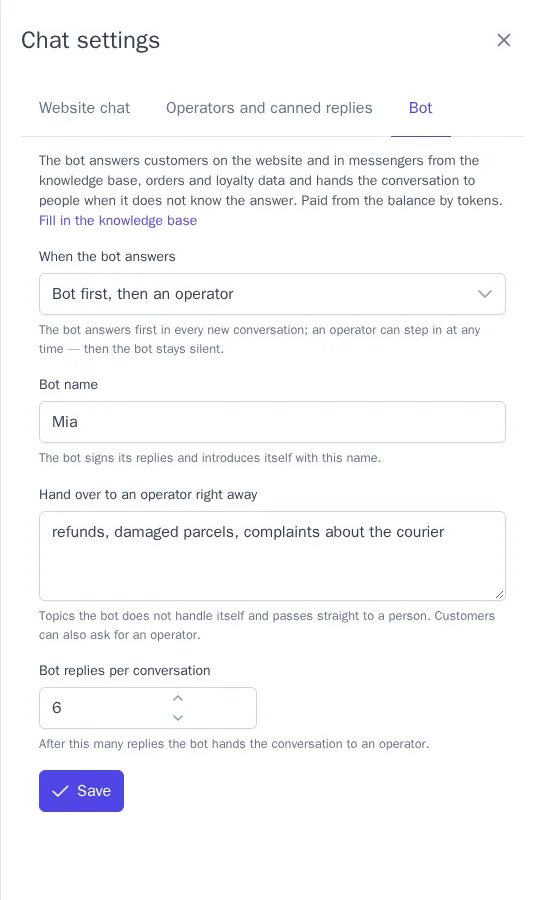
| Setting | What it does |
|---|---|
| When the bot answers | Off; Bot first, then an operator: the bot answers first in every new conversation; Only when no operators are online: the bot answers when no operators are online or outside working hours |
| Bot name | The bot signs its replies with this name. Asked "are you a human?", the bot honestly says it's an AI assistant |
| Hand over to an operator right away | Topics the bot doesn't handle itself, for example "refunds, courier complaints" |
| Bot replies per conversation | After this many replies, the bot hands the conversation to an operator (6 by default) |
How the bot behaves:
- It replies a few seconds after the customer's message, since customers often finish their thought in a second message.
- As soon as an operator replies or takes the conversation, the bot goes silent in that conversation.
- In the Only when no operators are online mode, a conversation started while operators were online stays with people.
- When the bot is available, the website chat shows as online even with no operators.
- If the chat is opened from a product page, the bot sees that product with its current price and availability, see Product questions.
Checks
Alongside the bot, a separate fast rating model works: Jev. It doesn't write replies; it answers questions about a text, so it costs hundreds of times less:
- Before replying, it looks at the customer's message. The bot doesn't reply to "thanks", "ok", and spam. If the customer asks for a person or is very upset, the conversation goes straight to operators, without an unnecessary bot reply.
- Before sending, it checks the bot's reply against what the bot found in the knowledge base and in the customer's orders and rewards. If the reply contains prices, terms, or promises (a refund, a discount, a specific date) that aren't in the data, or it doesn't answer the question, it isn't sent to the customer: the conversation is handed to operators, and the prepared reply is shown under the handover line with the Put in the reply box button.
- After closing, it analyzes the conversation, both the bot's part and the operators' part: whether the question was resolved, what it was about, how the customer feels at the end, and whether they were interested in buying. The results are in the report and in journeys and segments.
Before the check, emails, phone numbers, and card numbers are removed from the text, and the customer's profile data is not sent.
Handing over to an operator
The bot hands the conversation to people when:
- the customer clicks Talk to a person under the bot's reply in the website chat, or asks for a person in their own words;
- the customer is very upset;
- the question is on a topic from the Hand over to an operator right away list, the knowledge base has no answer, or the customer is unhappy;
- the bot's reply failed the check, in which case the prepared reply can be used as a base;
- the bot has replied the maximum number of times;
- the AI is unavailable: Claude didn't respond, the balance is empty, or the spending limit is reached.
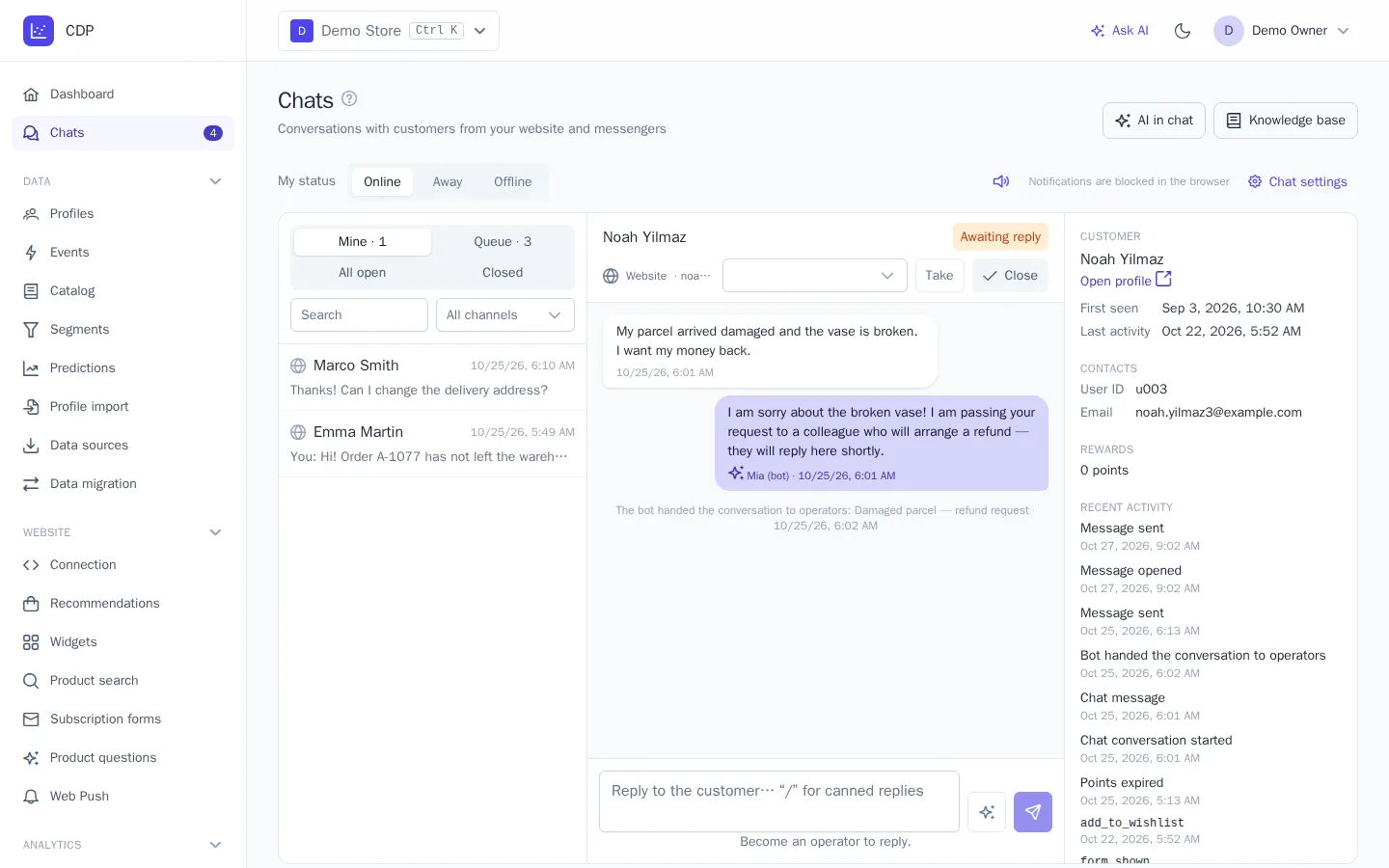
The conversation returns to the shared queue, and the line "The bot handed the conversation to operators" with the reason appears in it. In the operator window, the bot's replies are light, with sparkles, and signed "Name (bot)".
Report
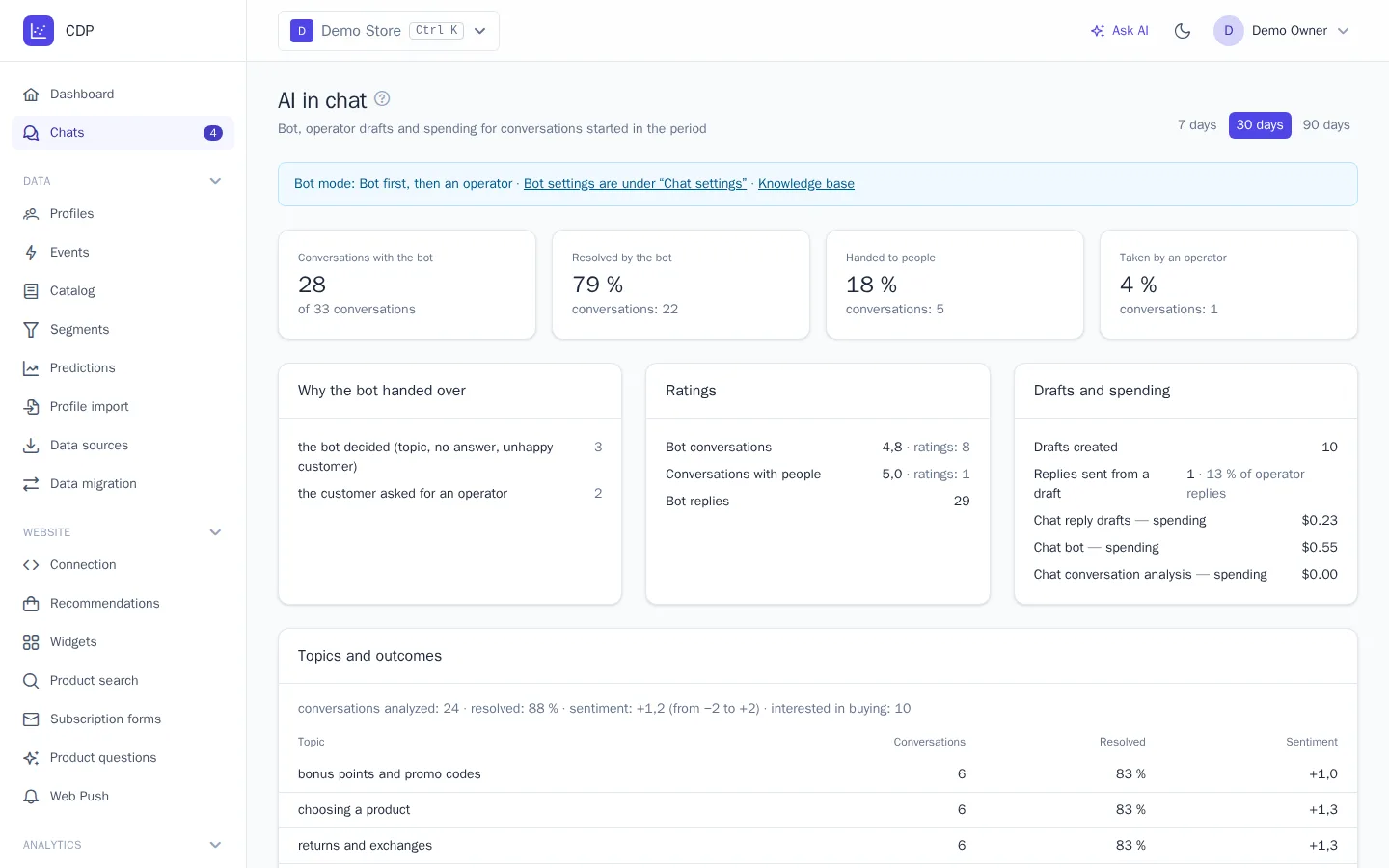
The AI in chat button in the header of the Chats section opens a report for 7, 30, or 90 days on conversations started in that period:
- Conversations with the bot and their outcome: Resolved by the bot, Handed to people, Taken by an operator;
- Why the bot handed over, by reason;
- Ratings of bot conversations and conversations with people, and how many replies the bot sent in total;
- Drafts and spending: how many drafts were created, how many operator replies were sent from them, and how much was spent from the balance on drafts, on the bot, and on conversation analysis;
- Conversation topics and outcomes: how many closed conversations were analyzed, the share resolved, the customers' average sentiment (from −2 to +2), how many customers were interested in buying, and a table by topic: orders, delivery, returns, payment, products, rewards, and others.
Journeys and segments
The Chat journey trigger has a "bot handed the conversation over" event. For example, a journey can add a tag to the customer or ask an hour later whether their question was resolved. The handover reason is in {{ event.properties.reason }}: visitor (the customer asked), frustrated (the customer is upset), guard (the reply failed the check), limit, error, unavailable, or model (the bot decided).
The "conversation analyzed" event arrives after a closed conversation is analyzed, with filters by topic and outcome. For example, if a question about a return isn't resolved, a journey can create a task for a manager or apologize with a promo code. In templates, {{ event.properties.topic }}, resolved, sentiment (from −2 to 2), and purchase_intent are available.
In segments, you can use the Bot handed the conversation to operators and Chat conversation analyzed events, with properties for topic, outcome, and sentiment.
Billing
AI in chat works on any paid plan; it's not available during the trial. Each AI reply costs as much as the amount of text (tokens) the model processed, plus the platform markup. Checks and conversation analysis are covered by the same payment and cost hundreds of times less than a reply. The money is charged to the project balance under Plan and billing, which is also where you top it up, set a monthly spending limit, and see the daily charge history.
When the balance runs out or the limit is reached, the draft button becomes inactive and the bot hands conversations to operators. You get emails in advance: when the balance is low and at 80% and 100% of the limit.