Diagnostics
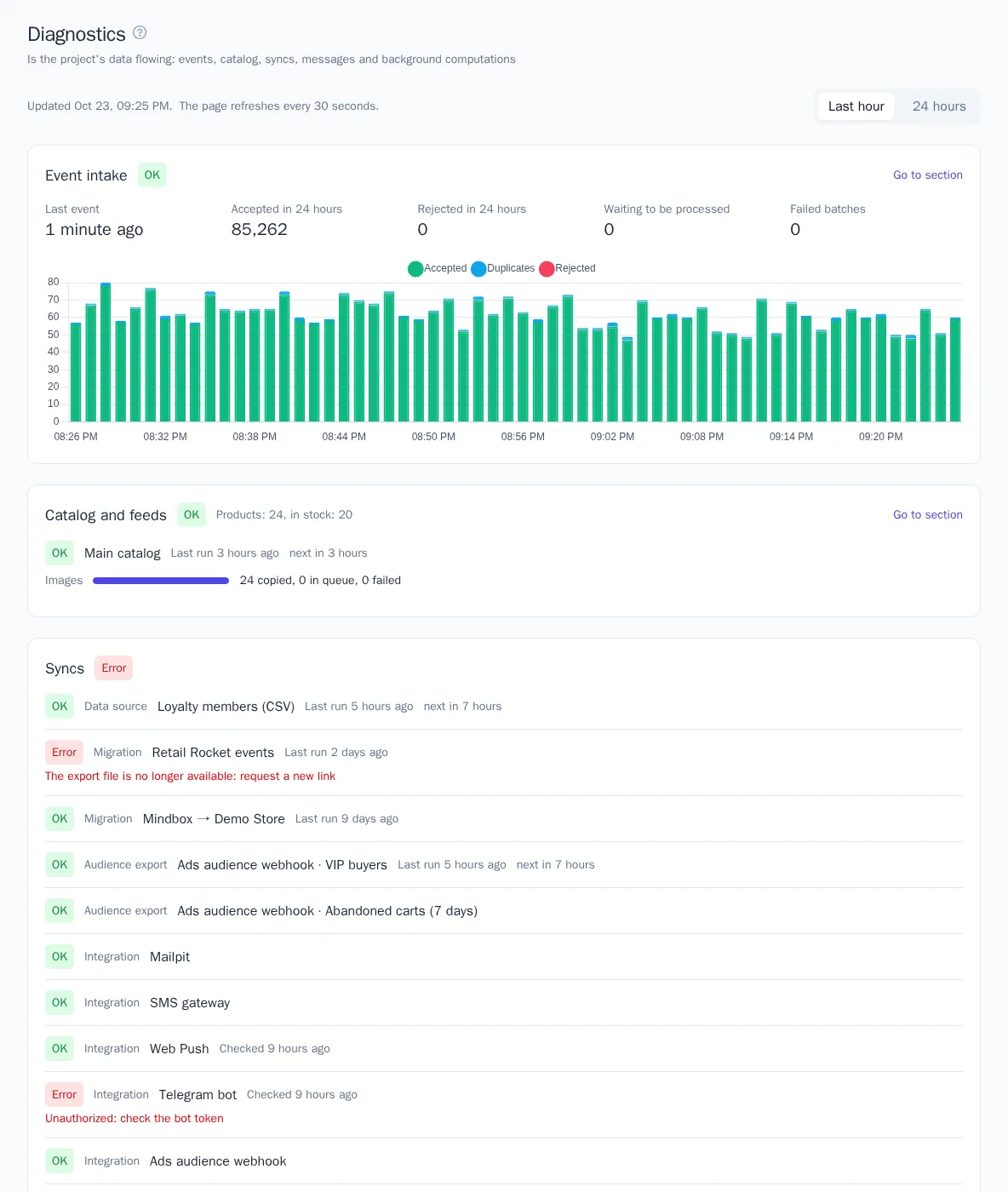
The Diagnostics page shows whether the project's data is flowing right now:
- whether events are being accepted;
- whether feeds are updating and product images are being copied;
- whether syncs and integrations are working;
- whether messages are going out;
- whether background computations are stuck.
Check this page if reports are empty, a widget has no images, or emails didn't arrive: the cause is usually visible here.
Where to find it
- Settings → Diagnostics in the project menu — the detailed page.
- The Diagnostics block on the dashboard — a one-line summary of each section and an Open diagnostics link.
While open, the page refreshes itself every 30 seconds. The switch at the top shows charts for the Last hour (by minute) or for 24 hours (by hour). History is kept for 24 hours.
Statuses
Each section and each row within it has a status. A section's status is the worst status of its rows.
| Status | What it means |
|---|---|
| OK | Everything is working |
| Attention | Working, but with deviations: some events were rejected, there have been no events for more than a day, a scheduled run is more than 30 minutes late, messages are going out with errors |
| Error | Action needed: a feed or sync ended with an error, messages are stuck in the queue, events were not processed |
| No data | The section hasn't been used yet: for example, the project hasn't received a single event |
Who sees what
The page is open to all project members, and its sections are shown according to permissions — the same way as menu items. For example, the User role sees event intake, the catalog, messages, and computations, while data sources, migrations, and integrations are visible to Manager and above. If a role grants access to only some segments, journeys, or integrations, diagnostics doesn't show them. Learn more about permissions in Members and roles.
Event intake
| Metric | What it means |
|---|---|
| Last event | When the project received its most recent event |
| Accepted in 24 hours | Events accepted in the last 24 hours, including uploads of past periods |
| Rejected in 24 hours | Events that were not accepted: the plan's event limit is used up or the project is suspended |
| Waiting to be processed | Events that were accepted but not yet written to profiles. Usually this takes seconds |
| Failed batches | Event batches that were not processed after all retries |
The chart shows accepted events, duplicates, and rejected events. A duplicate is an event with the same messageId as one that has already arrived: it isn't counted a second time. Duplicates are normal when the tracker or a server resends an event after a lost connection.
If there have been no events for more than a day, the section gets the Attention status. Check that the tracker is installed on the site and that integrations and data sources are sending events.
Catalog and feeds
At the top of the section are the number of products and how many of them are in stock. Below, for each feed:
- status;
- time of the last and next run;
- error text, if the last run failed.
If a feed copies product images, below you can see how many images have been copied, how many are waiting in the queue, and how many could not be downloaded. The copy queue chart shows how the queue is worked through after a feed update. The copy rate is set in the feed settings (Download at most) — see Recommendations and product catalog.
Syncs
This section collects the connections that exchange data with other systems:
- data sources and migrations — see File imports and data sources and Moving from other platforms;
- audience exports — see Audience exports;
- channel integrations — see Integrations and channels;
- store MCP and site pages in the knowledge base — see Store data for the bot and Knowledge base.
Each row shows the time of the last run (for integrations, the last check), the next run, and the error text. The name links to the connection's page.
Messages
| Metric | What it means |
|---|---|
| In 24 hours | All project messages in the last 24 hours |
| Failed in 24 hours | Messages the channel couldn't deliver |
| Stuck in queue | Messages that have been waiting to be sent for more than 15 minutes |
Below are the time of the last sent message for each channel and a chart of messages over 24 hours by hour: sent, queued, skipped (for example, no consent or the frequency limit was hit), and failed. The Sending queue chart shows how many messages were waiting to be sent: after a large campaign starts, the queue grows and is worked through within minutes.
Background computations
| Computation | What is checked |
|---|---|
| Recommendations | Model state and time of the last computation |
| Predictions | Model state and time of the last computation |
| Search learning | How many queries have been learned and when |
| Segments | Segments whose computation failed and stuck ones (computing for more than 30 minutes) |
| Journeys | Participant waits overdue by more than 5 minutes |
Job queue
Bulk jobs of the project — campaigns, catalog indexing, event history uploads, journey steps, scheduled feed imports, syncs, and nightly computations — are processed in turn with jobs of other projects. While the project is alone, it uses the full processing capacity. When other projects have jobs waiting too, each one gets a share of places, so one store's large campaign doesn't delay a neighbor's emails. The share depends on the plan: on Growth it is twice as large as on Starter, on Enterprise four times as large.
The section appears when the project has had jobs in the queue in the last 24 hours. It shows how many jobs are waiting right now and of which kinds, and a chart of the queue. If jobs have been waiting every minute for more than half an hour, the section gets the Attention status: under shared load the project hits its share. Jobs aren't lost in this case — they are processed as places free up.
What to do if…
| What you see | What to check |
|---|---|
| No events for more than a day | The tracker on the site, API keys of integrations, the data source schedule |
| Some events are rejected | Event usage on the Plan and billing page — see Plan and billing |
| There are failed batches | Contact support: such batches can be processed again |
| Feed with an error | Whether the feed URL is reachable and whether its format has changed |
| Images aren't being copied | Whether the images are reachable at the feed's links and whether the plan's media library storage is used up |
| Sync with an error | The error text: most often the access key has expired or the address is unreachable |
| Messages are stuck in the queue | Channel integrations on the Integrations page; if they are fine, contact support |
| A segment is stuck | Open the segment and click Recompute; if that doesn't help, contact support |
| Jobs wait in the queue for a long time | Run large one-off operations (history uploads, a campaign to the whole base) outside peak hours; a constant lack of share is a reason to move to a higher plan — see Plan and billing |