Event schema
An event schema describes which events should arrive in the project and with which properties: order_completed with a required numeric amount, currency only EUR or USD. OneTrace.pro checks every event against the schema and shows violations: a typo in an event name, an amount sent as a string, a missing property. Tracking mistakes on the website or in an integration are caught right away, not after a segment or report has already been calculated incorrectly.
An event that breaks the schema is still accepted and reaches the profile: no data is lost, even if the schema itself is wrong. The event schema is available from the Growth plan.
Describe events
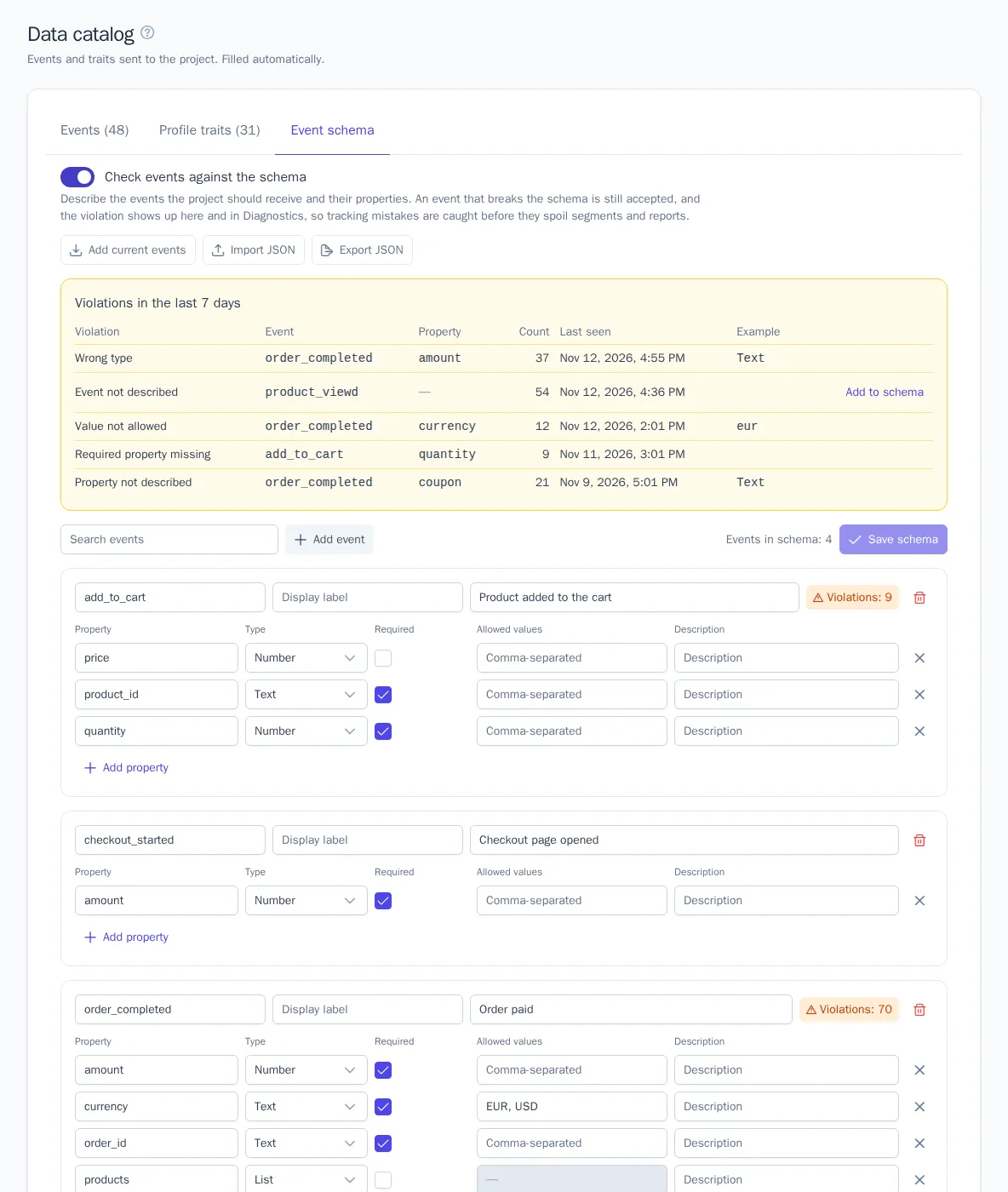
Open the Data catalog and the Event schema tab. Roles with the Manage the event catalog permission, Manager and above, can change the schema; everyone else sees the schema and violations.
- Click Add current events: all events from the catalog are added to the schema with their properties and detected types. Or add events one at a time with Add event.
- Check the properties of each event:
| Column | What it sets |
|---|---|
| Property | The property key as the website or server sends it, for example amount |
| Type | Text, number, yes/no, date and time, list, or object. Date and time also fits a text property |
| Required | An event without this property or with an empty value is a violation |
| Allowed values | Comma-separated, only for text and numbers. A value not in the list is a violation; case matters: eur and EUR are different values |
| Description | For developers: what the property means |
- Remove events and properties that should no longer arrive: if they do arrive, that's an Event not described or Property not described violation.
- Click Save schema and turn on Check events against the schema.
Changes accumulate on screen and are saved together. After saving, the violation counters start over: earlier violations belong to the old schema. A schema event that has never arrived is marked Not received yet on the Events tab, and schema events are marked In schema.
Platform system events ($identify, $page, $message_sent, and others), as well as identify calls and page and app screen views, aren't checked: their schema is defined by the platform.
Violations
| Violation | Example |
|---|---|
| Event not described | product_viewd arrived instead of product_viewed |
| Property not described | order_completed arrived with a coupon property that isn't in the schema |
| Required property missing | add_to_cart without quantity |
| Wrong type | The amount arrived as the string "1250" instead of the number 1250 |
| Value not allowed | currency = eur, while the schema has EUR and USD |
Violations for the last 7 days are shown above the list of schema events: how many times and when the last one occurred, plus an example, either the value type or the disallowed value itself. Without permission to see personal data, the example is masked. If an event is not described because of a mistake in the schema rather than in tracking, click Add to schema: the event is added to the draft with its properties from the catalog.
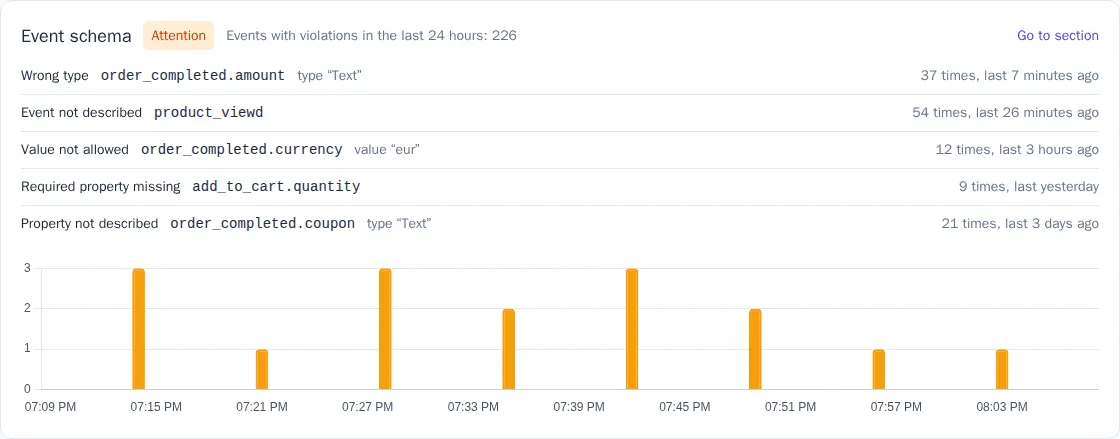
The same violations and a 24-hour chart of events with violations are in Diagnostics.
Import, export, and API
Export JSON downloads the saved schema, and Import JSON loads a file into the draft: review it and save. This is how you move one schema between projects, for example to all stores in a chain or from a test project to the live one.
With the public API, you can read the schema (GET /api/v1/event-schema) and replace it entirely (PUT /api/v1/event-schema, key permission Modify the event schema), and get violations for the past week with GET /api/v1/event-schema/violations. The file and the API use the same format:
{
  "enabled": true,
  "events": [
    {
      "name": "order_completed",
      "label": "Placed an order",
      "properties": [
        { "key": "amount", "type": "number", "required": true },
        { "key": "currency", "type": "string", "required": true, "values": ["EUR", "USD"] }
      ]
    }
  ]
}
Events that aren't in the document leave the schema but stay in the data catalog with their labels and statistics. A document without events only turns checking on or off.