Next best action
The Decision journey node picks what to do next for each participant on its own: give a discount, offer free shipping, send a product selection, or send nothing. Unlike an A/B split, the node doesn't divide participants by set shares. It estimates how much each action adds for this particular customer compared to "nothing", picks the best one, and learns from the outcomes of its decisions.
The node is available on a plan with predictions, from the Growth plan. See Plans. Decisions are based on prediction traits: purchase probability, churn risk, engagement, RFM scores, purchase recency, and activity. That's why the project needs a purchase event set up.
Setting up the node
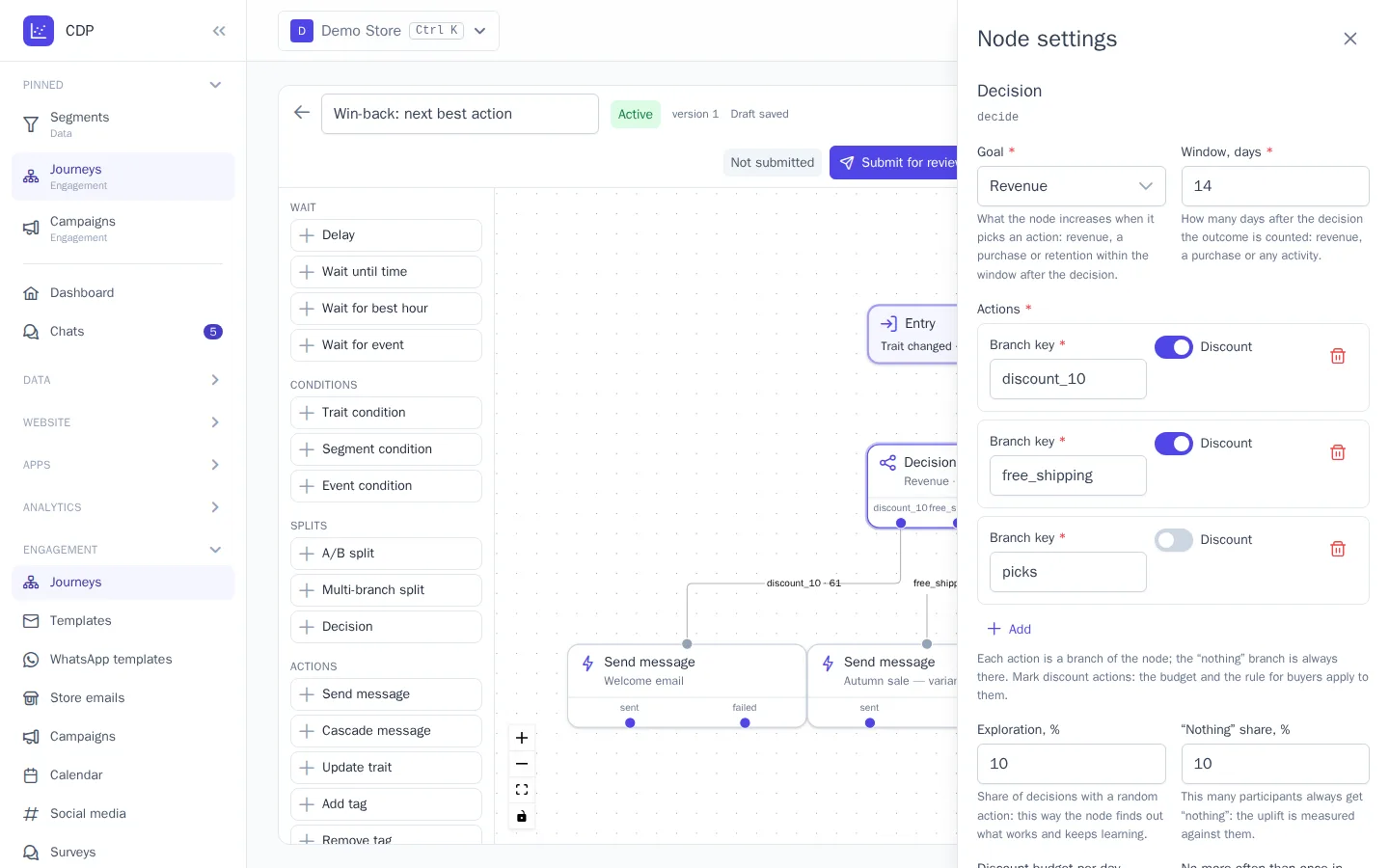
Add the Splits → Decision node to a journey and open its settings:
- Goal: what the node increases. Revenue within the window after the decision (default), Purchase: whether there was a purchase, or Retention: whether there was any activity;
- Window, days: how many days after the decision the outcome is counted, from 1 to 60, 14 by default;
- Actions: up to 8 branches with keys, for example
discount_10,free_shipping,picks. The nothing branch is always there. Mark Discount on discount actions: the budget and the rule for buyers apply to them; - Exploration, %: the share of decisions with a random action, 10% by default. This way the node keeps testing all actions and notices when the best one changes;
- "Nothing" share, %: this many participants always get "nothing", 10% by default. The uplift is measured against them. Together with exploration, no more than 90%;
- Discount budget per day: how many discount decisions the node can make per day in the project's time zone. After that, discounts aren't chosen until the next day;
- No more often than once in, days: a customer who got an action from any Decision node within this time gets "nothing";
- No discount for buyers: a discount isn't chosen if the customer is expected to buy without it (on by default).
Connect a node to each branch: Send message with the right template, Issue a promo code, or another action. The "nothing" branch can be left unconnected, in which case the participant's path ends there.
How the node chooses
- If the customer recently got an action from any Decision node (the No more often than once in, days setting), they get "nothing".
- If today's discount budget is used up, discounts are excluded.
- If No discount for buyers is on, a discount is excluded when the model sees no uplift from it compared to "nothing". Until there's a model, a discount is excluded when the purchase probability is 70% or higher.
- Of the remaining actions, the "nothing" share gets "nothing", the exploration share gets a random action, and all other participants get the action with the highest expected goal value.
Until there's a model, the node chooses between actions equally: this collects fair data for training. A model appears once the node has 100 decisions with a counted outcome, and an action has at least 30 decisions, including at least 5 successful and 5 unsuccessful ones. An action without its own model is only chosen through exploration. In the first weeks after launch, the choice is almost random.
Each decision is recorded with the probability with which the action was chosen. Training takes this into account: actions that were chosen less often get more weight, so the comparison stays fair even once the node already prefers one of them.
Outcomes and learning
A decision's outcome is counted once the window has passed: revenue from purchases within the window, whether there was a purchase, or whether there was any activity. The purchase event and amount are the same as for predictions. All purchases within the window count, not only those made via a link in a message: this treats all actions the same way, so the comparison isn't skewed.
Models are retrained every night after predictions are recalculated, using decisions from the last 180 days. A fifth of the decisions is held out for validation: on them, the node compares how much its policy would have brought in with how much "always nothing" would have. This difference is the uplift vs "nothing" in the report.
Report
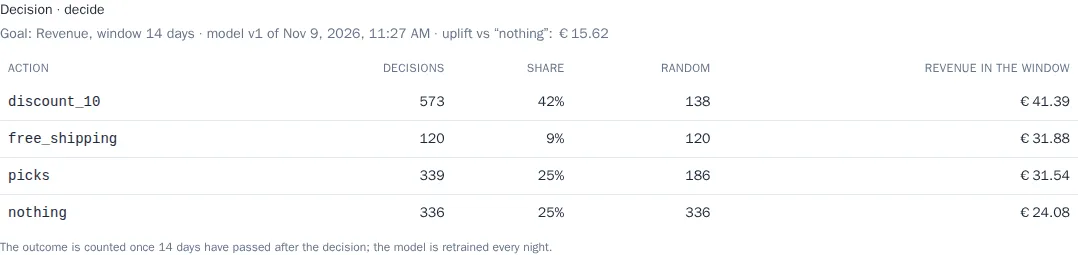
In the Journey report, each Decision node has a table for the selected period:
- Decisions, Share: how many times an action was chosen;
- Random: how many of them were chosen through exploration or the "nothing" share rather than by the model;
- Revenue in the window, Purchases, or Returned: the action's average outcome over decisions whose window has already passed.
Above the table are the model version, when it was trained, and the uplift vs "nothing" on the held-out decisions. Until there's a model, it says that the model is learning.
Why a customer got this action
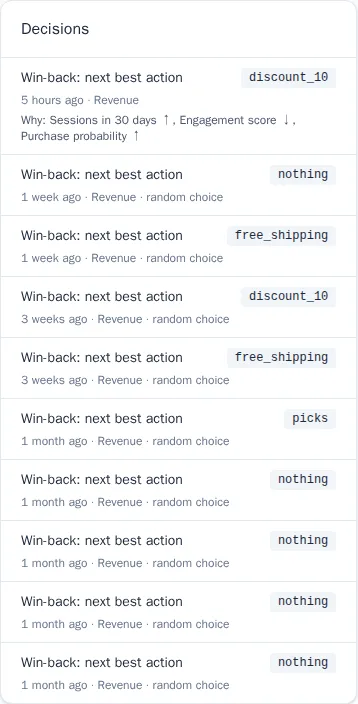
On the profile card, the Decisions block shows the last 10 decisions: the journey, the chosen action, the goal, and a "random choice" mark. If the model chose the action, the Why line lists the customer's main attributes that influenced the choice: an up arrow means the attribute favors the action over "nothing", a down arrow means it works against it. Roles with access to journeys can see the block.
For a Decision node, the participant's step log records the reason for the choice (model, exploration, "nothing" share, no model, frequency limit), the selection probability, and the expected goal value for each action.
Tips
- Start with 2–3 actions: the fewer there are, the faster the node collects data.
- Place the node where a decision is really needed: when churn risk rises, after an abandoned cart, before points expire.
- Don't reduce the "nothing" share to zero in the first months: without it, there's nothing to measure the uplift against.
- A branch key can't be renamed without losing history: decisions and the model are tied to the action key.