AI search
AI search understands a query written in plain words: "waterproof running shoes under 100 euros, but not Contoso", "a gift for a runner", "a bag for a 15-inch laptop". The AI turns the query into catalog filters — categories, brands, attributes, price, and exclusions — and product search shows products by these filters. Above the products there's a short AI tip and refinement chips: "cheaper", "women's", "another colour". The regular results appear right away, as always, and the AI results replace them once the parsing is ready. If the AI doesn't answer, the regular results stay.
AI search is part of product search: it requires the tracker, the catalog, and the search widget or a store plugin. The AI is paid by usage from the project balance and works on a paid plan, see Billing and limits.
How to turn it on
On the Website → Product search page, in the AI search block, choose When to use AI. The choice is saved right away.
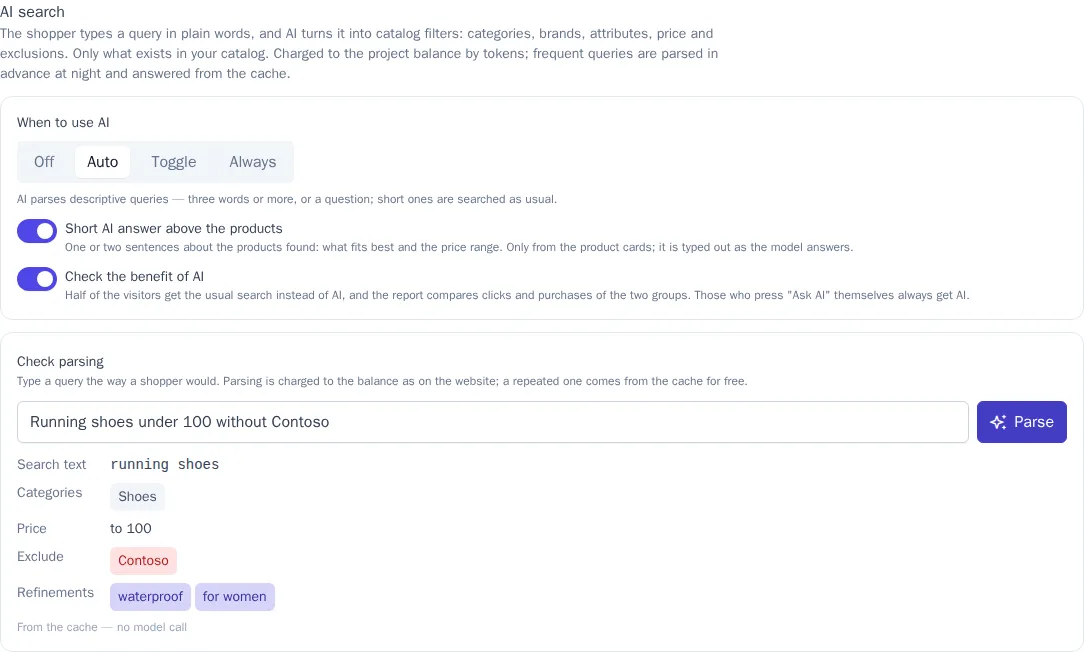
| Mode | When the AI parses the query |
|---|---|
| Off | never: search works as usual |
| Auto | a descriptive query — three words or more, or a question; short queries ("sneakers", "nike") are searched as usual |
| Toggle | only when the shopper has pressed "Ask AI" |
| Always | every query |
In the Auto and Toggle modes, the visitor has an Ask AI button — next to the results sorting and as a row in the suggestions layer: with it, the AI parses a short query too.
- Short AI answer above the products — one or two sentences about what was found: what fits best and the price range. Turn it off if you only need the filters.
- Check the benefit of AI — half of the visitors get the regular search, and the report compares clicks and purchases of the two groups, see Checking the benefit of AI.
Check the parsing
The Check parsing field shows what the AI understood from the query: the search text, categories, brands, attributes, price, exclusions, sorting, and refinements. Type a query the way a shopper would and click Parse. Parsing is charged the same as on the website; parsing the same query again comes from the cache for free — the result says "From the cache — no model call".
If the AI found nothing from the catalog in the query, the search will use the text — the note under the field says so. That's a reason to add the categories or attributes shoppers search for to your catalog.
What the shopper sees
- The shopper types a query — the regular results appear right away.
- Above the products — "AI is picking products…". A second or two later, the AI results replace the regular ones.
- The AI answer is typed out as the model answers, under the "AI tip" heading.
- The AI understood: chips show the applied filters: category, brands, attributes, price, and exclusions with a "−" sign. A chip can be removed — the results update right away, with no model call.
- Refinements — chips and the "Refine: cheaper, another colour…" field. A refinement continues the previous query: "cheaper" after "Northwind running shoes" keeps the brand and lowers the price.
- Ask in chat opens the website chat with the shopper's query, if the chat is connected.
- Regular search brings back the regular results until the query changes.
If the catalog has nothing that was asked for, the AI relaxes the filters: first it drops attributes and exclusions, then the price, then it searches by the original text. Above the products it then says "No exact matches — showing similar products."
If the visitor has picked filters or sorting in the results themselves, the AI doesn't overwrite their choice: the selected sorting is applied on top of the AI results, and the visitor's own filters bring back the regular results.
How the AI parses a query
- Only the catalog. The AI receives the categories, brands, and attribute values of your catalog and chooses from them. Anything that isn't in the catalog is dropped: the AI doesn't make up a brand or a size.
- Language. The query can be written in any language: the AI translates the search text into the catalog language and writes refinements in the shopper's language.
- Cache. Query parsing is kept for 7 days: the same query in the same language is parsed without the model and for free. Every night, the website's popular queries of the last 30 days are parsed in advance — up to 100 queries per project — so frequent queries are answered right away.
- The answer above the products is written only from the cards of the products found: name, brand, price, availability, and attributes. A sentence with a number that isn't in the cards (a price, a discount, a delivery time) is removed. A ready answer for the same query and the same products is kept for a day.
- The order of products stays the search order: learning from clicks, the visitor's interests, and semantic search also work in the AI results, see How products are found.
Store plugins
The WooCommerce and Magento 2 plugins and the 1C-Bitrix module in product search mode show the AI results on the store's search page. The store theme draws the products as usual, and above them the tracker shows the AI block: the tip, the "AI understood:" chips, refinements, and "Regular search". Removing a chip or refining opens the same search page with new parameters.
The plugin waits for the parsing no longer than 2.5 seconds. Popular queries are parsed at night and open right away; a new descriptive query opens 1–2 seconds slower than usual. If the parsing didn't make it in time, the store shows the regular results. Requires WooCommerce 1.18.0, Magento 2 1.15.0, or 1C-Bitrix 1.14.0 or later.
Your own results page
If you have your own results page, get the AI results in the tracker:
const result = await cdp.searchAi(q, { perPage: 24 });

if (result.ai) {
  // result.items — products, result.ai.understood — the "AI understood" chips, result.ai.refinements — refinements,
  // result.ai.relaxed — the filters were relaxed, result.ai.state — the parsing for the next request
  await cdp.searchAiAnswer(q, result.items.slice(0, 6).map((item) => item.id), (text) => { answer.textContent = text; });
} else {
  // The query doesn't need the AI, or the AI is unavailable or didn't make it in time — show the regular results of cdp.search(q)
}
cdp.searchAi options: previous — the result.ai.state of the previous answer together with the refinement phrase ("cheaper"), state — the parsing without the removed chip (results with no model call), asked: true — the visitor pressed "Ask AI", as well as sort, page, perPage. Parsing waits for the model's answer up to 8 seconds. Requires tracker 1.37.0.
Servers can make the same request with a write key — POST https://cdp.onetrace.pro/api/v1/search/ai; in the PHP SDK — search()->ai(). The full list of parameters is in the API reference: https://cdp.onetrace.pro/api/v1/openapi.json.
Report
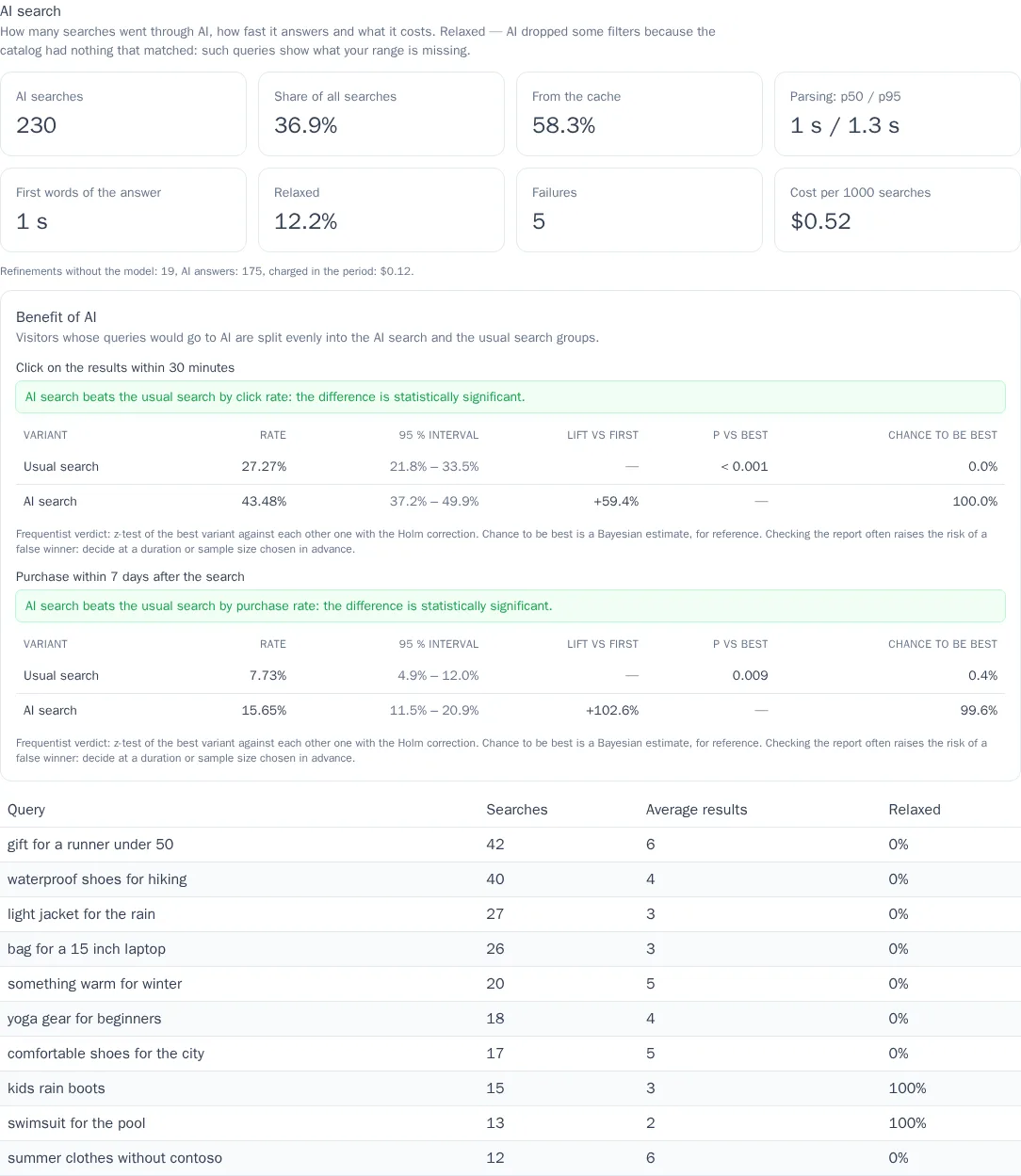
While AI search is on, the AI search report for the same period is shown under the query report on the Website → Product search page.
| Metric | What it shows |
|---|---|
| AI searches and Share of all searches | how many results the AI showed and what part of the website's searches that is |
| From the cache | the share of results with no model call — free and instant |
| Parsing: p50 / p95 | how long the model takes to parse a query for half and for 95% of searches |
| First words of the answer | how soon the shopper sees the beginning of the AI tip |
| Relaxed | the share of searches where there were no exact matches and the AI dropped some filters |
| Failures | parsings the model didn't answer; in these cases the shopper saw the regular results |
| Cost per 1000 searches | how much was charged to the balance for AI search, per 1000 searches |
Under the metrics — how many refinements were done without the model, how many AI answers there were, and how much was charged in the period. The table lists the queries the AI parsed, with the number of products found and the share of relaxed searches: queries with a high share of relaxing show what your range is missing.
Checking the benefit of AI
Turn on Check the benefit of AI to find out whether the AI helps sell. Visitors who would get the AI are split evenly into two groups: one gets AI search, the other the regular search. A visitor always stays in their group. Anyone who presses "Ask AI" themselves or refines a query gets the AI in either group. Searches of the regular search group are not paid as AI.
In the report, the Benefit of AI block compares the groups:
- Click on the results within 30 minutes — the share of searches after which the visitor clicked a product in the results of that query;
- Purchase within 7 days after the search — the share of searches after which the same customer bought something. Shown when a purchase event is set in the recommendation settings, see Recommendations and product catalog.
The verdict works as in other variant comparisons: while there's too little data, the report says so; when the difference is statistically significant, it names the winner. If the regular search is better, check how frequent queries are parsed in the Check parsing field. Clicks on the results are recorded by the search widget; on the plugins' search page the store theme doesn't record clicks, so only purchases are compared there. After you turn the check off, the report shows the results for the period while it ran.
Billing and limits
Each AI parsing and answer costs as much as the amount of text (tokens) the model processed, plus the platform markup. The money is charged to the project balance; in the balance history, this is the "AI search" line. Parsing from the cache, removing a chip, next pages, and changing the sorting use no model and are free. The platform chooses the model; parsing one query usually costs a fraction of a cent.
- AI search works on a paid plan that includes product search. During the free trial, with no money on the balance, or at the spending limit, the AI doesn't turn on — shoppers see the regular search.
- A request to the AI is one more search request in the plan's monthly limit, see Request limit. The widget fetches the regular results and the AI results at the same time, so a descriptive query in the widget counts twice; in store plugins — once. Queries that didn't need the AI or for which it was unavailable, and searches of the regular search group in the benefit check, aren't counted a second time.
- One visitor can call the model no more than 10 times a minute and 100 times a day; beyond that, they see the regular results. Answers from the cache don't count toward these limits.
- From one address — no more than 30 model calls a minute and 300 a day across all AI features of the site; the shop server with the plugin and the secret key is not limited by this. How much AI on the site may spend per day is set by the daily budget: once it is spent, regular search works until midnight.